
CSV Editor
View and edit CSV and TSV files as a spreadsheet, right in your browser. Tachi Code renders delimited data in a grid you can edit cell by cell — with clipboard paste, keyboard navigation, and full undo — alongside the raw text. No setup, no sign-up.
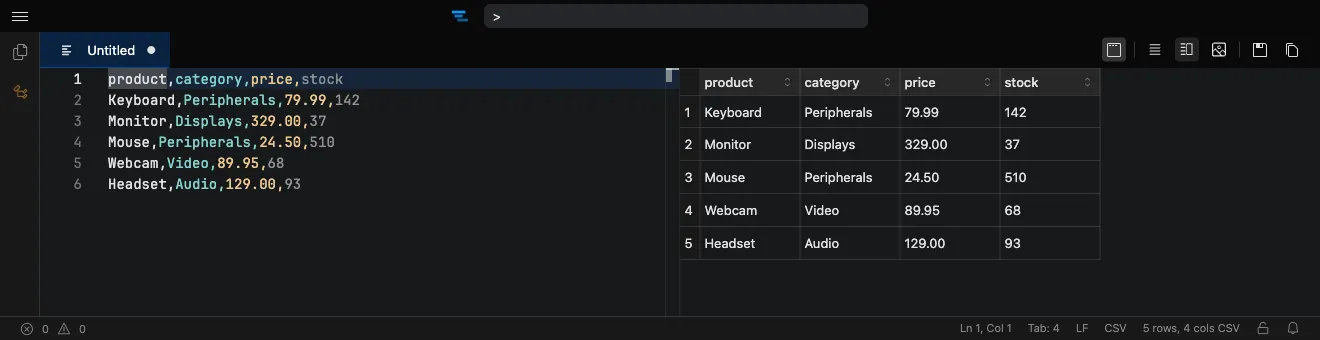
How it works
Section titled “How it works”- Open the editor at tachicode.dev and paste or open your CSV.
- The data renders in a spreadsheet-style grid beside the text.
- Click a cell and type to edit, or paste rows from your clipboard.
- Edits flow back into the underlying file with full undo/redo.
What you can do
Section titled “What you can do”- Inline cell editing with type-to-edit, paste, and keyboard navigation.
- CSV and TSV support.
- Full undo/redo, kept in sync with the raw text.
- Private by default — files never leave your browser.
- Works offline once the extension is installed.
Frequently asked questions
Section titled “Frequently asked questions”Is the CSV editor free?
Yes. Tachi Code runs free in your browser at tachicode.dev, with no account required.
Can I edit cells directly?
Yes — type to edit a cell, paste tabular data from your clipboard, navigate with the keyboard, and undo or redo any change.
Does it support TSV files too?
Yes, both CSV and TSV files open in the spreadsheet-style grid.
Is my data uploaded anywhere?
No. Files stay in your browser — nothing is sent to a server.