
JSON Editor & JSONPath
A fast, browser-based JSON editor with the tools you actually need: syntax highlighting, inline error checking, one-click Prettier formatting, and a live JSONPath filter pane for drilling into large documents. No setup, no sign-up.
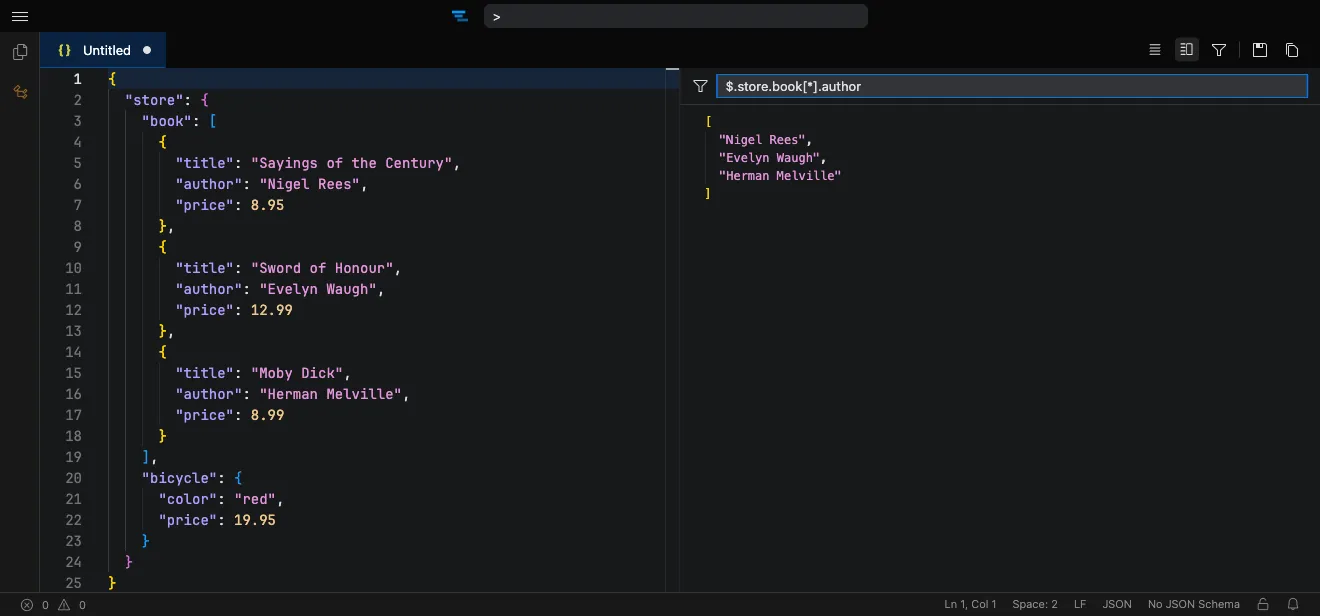
How it works
Section titled “How it works”- Open the editor at tachicode.dev and paste your JSON.
- Format it with Prettier, or fix the inline-highlighted syntax errors.
- Open the JSONPath filter pane and enter an expression to query the document.
- Read or copy the matching results from the filter output.
What you can do
Section titled “What you can do”- Edit JSON and JSONC with syntax highlighting and inline error checking.
- Query with JSONPath in a live filter pane that updates as you refine the expression.
- Format with Prettier in one click.
- Schema validation & autocomplete from JSON Schema Store — catch errors and get suggestions against thousands of known schemas.
- Works offline once the extension is installed.
Frequently asked questions
Section titled “Frequently asked questions”Is the JSON editor free?
Yes. Tachi Code runs free in your browser at tachicode.dev, with no account required.
Can I query JSON with JSONPath?
Yes. Open the JSONPath filter pane, type an expression like $.store.book[*].author, and the matching results update live.
Can it format or prettify JSON?
Yes — format JSON and JSONC with the built-in Prettier formatter.
Does it validate JSON against a schema?
Yes. Syntax errors are highlighted inline, and JSON files are validated and autocompleted against schemas from JSON Schema Store (or your own schema).