
Context Menu
Tachi Code includes several features that integrate with the browser’s context menu, allowing you to quickly open content in Tachi Code.
Selecting a context menu item will open the relevant content in Tachi Code in a new browser tab.
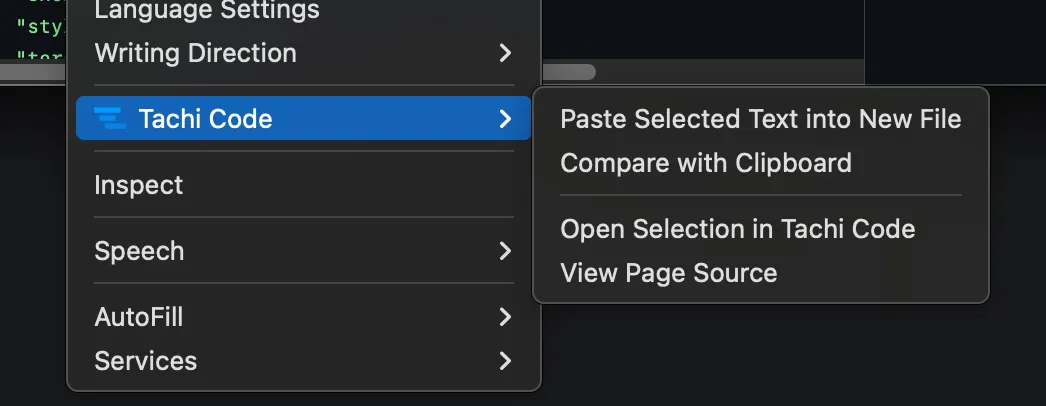
Context Menu Features
Section titled “Context Menu Features”Paste Selected Text into New File
Section titled “Paste Selected Text into New File”Creates a new file in Tachi Code with the text currently selected in your browser.
Compare with Clipboard
Section titled “Compare with Clipboard”Opens a new Tachi Code tab comparing the contents of the clipboard with the current tab’s selected content in a diff view.
Open Selection in Tachi Code
Section titled “Open Selection in Tachi Code”Opens the currently selected DOM element’s HTML source code in Tachi Code. This is useful for quickly viewing and editing the source of a specific element on a webpage.
If the the selected DOM element is an SVG element or child of an SVG element, Tachi Code will open the SVG source code in a new tab.
View Page Source
Section titled “View Page Source”Opens the HTML source code of the current webpage in Tachi Code. This allows you to view and edit the entire page’s source code.
Configuration
Section titled “Configuration”You can enable or disable these context menu features in the Tachi Code settings.
Read the Settings page for more information on how to configure Tachi Code’s context menu features.